Home Prompts Trending Prompt 4-LAYOUT ALFAAZ SHY GIRL
4-LAYOUT ALFAAZ SHY GIRL
Trending Prompt

4-LAYOUT ALFAAZ SHY GIRL

Prompt
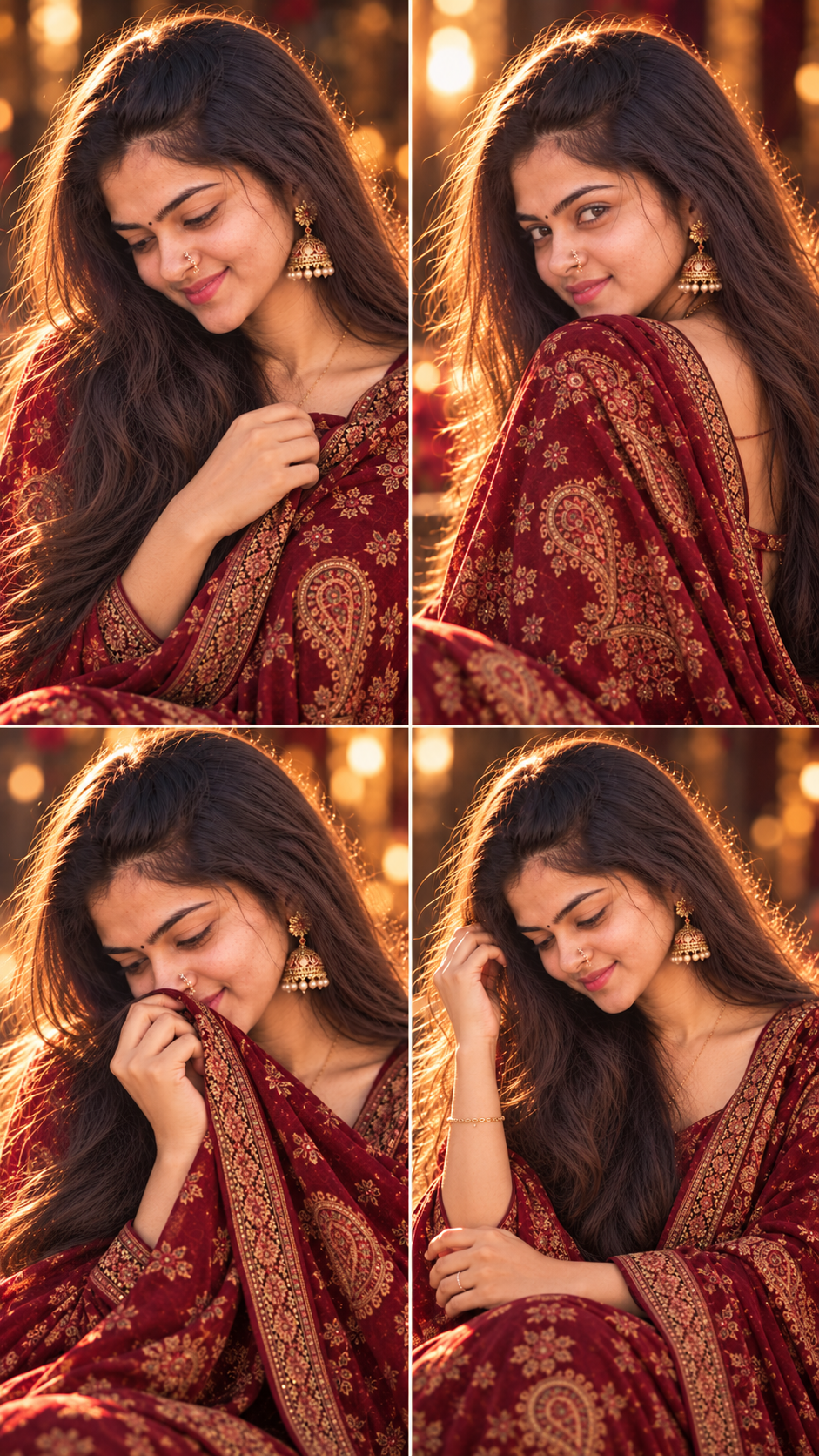
**Create a high-end ultra-realistic 4-layout cinematic portrait collage using the uploaded reference photo as the ONLY identity reference. Keep the exact same woman in all four layouts — identical facial identity, facial structure, eyes, nose, lips, skin tone, hairstyle and natural features. Do not change her identity between frames.** **Overall styling:** A beautiful young Indian woman wearing a luxurious **deep burgundy/maroon traditional shawl/dupatta with intricate antique-gold paisley and floral patterns**, elegant traditional gold jhumka earrings and a delicate traditional nose ring. Long dark brown-black hair, naturally flowing with a few loose strands around her face. Minimal elegant makeup, natural glowing skin, soft pink lips and expressive eyes. **Create exactly 4 different portrait layouts in one cohesive editorial series, each with a different pose and shy romantic expression:** **LAYOUT 1 — Shy Side-Turn:**\ She sits slightly sideways with her shoulders turned away from the camera. Her head gently turns toward the camera while her eyes look slightly downward and to the side. A tiny bashful smile, one hand softly holding the edge of her shawl near her shoulder. **LAYOUT 2 — Looking Back:**\ Her body faces slightly away from the camera while she turns her head back over her shoulder. She looks toward the camera from the corner of her eyes with a subtle shy smile. A few loose strands of hair cross naturally near her face. **LAYOUT 3 — Shawl Cover:**\ She gently lifts the edge of her burgundy shawl near her cheek, partially covering the lower side of her face. She looks downward with a cute bashful smile and slightly tilted head, creating an innocent romantic expression. **LAYOUT 4 — Dreamy Looking Down:**\ She sits gracefully with her body slightly angled, chin gently lowered and eyes looking down. She has a soft closed-mouth smile and dreamy expression. One hand rests naturally near her hair while the other holds the embroidered shawl. **Lighting for ALL 4 layouts:** warm golden-hour sunset backlight, beautiful glowing **golden rim light around individual hair strands**, soft amber illumination on the face, delicate highlights on jewelry, dark warm brown/burgundy background with dreamy circular golden bokeh. **FILTER / COLOR GRADING:** apply a consistent **soft cinematic vintage filter** across all four layouts — warm golden tones, subtle film grain, gentle bloom, creamy highlights, slightly faded cinematic colors, rich burgundy shadows, soft contrast and natural skin texture. Elegant Instagram/Reels aesthetic, not over-processed. **Photography:** professional Indian fashion editorial photography, romantic cinematic music-video aesthetic, 85mm portrait lens, f/1.4, shallow depth of field, realistic skin pores, detailed hair strands, realistic fabric texture, natural shadows, photorealistic, high dynamic range, premium color grading. **Composition:** **4-panel vertical 9:16 layout**, four clearly separated but visually connected frames, consistent lighting and styling, each panel showing a different pose, beautiful balanced composition, high-resolution Instagram Reel aesthetic. **Mood:** shy, romantic, innocent, graceful, dreamy, feminine, warm, elegant and emotionally expressive. **IMPORTANT:** Same woman and same outfit in all 4 layouts. Natural facial identity consistency. No face swapping between panels, no different person, no text, no watermark, no logo, no Instagram UI, no plastic skin, no excessive beauty filter, no distorted eyes, no deformed hands, no extra fingers, no cartoon, no CGI, no oversaturated colors.
558 Views 66 Copies
About This Prompt

4-LAYOUT ALFAAZ SHY GIRL

**Create a high-end ultra-realistic 4-layout cinematic portrait collage using the uploaded reference photo as the ONLY identity reference. Keep the exact s...
How It Works

How to Use This AI Prompt

Copy the prompt, paste it into your preferred AI tool, and adjust the details when needed.

01

Copy the Prompt

Use the Copy Prompt button to copy the complete prompt.

02

Open Your AI Tool

Open the AI platform you want to use for your project.

03

Paste the Prompt

Paste the prompt into your preferred AI tool and run it.

04

Customize It

Change the subject, style, setting or other details.

Customize

Customize the Prompt for Your Idea

Personalize the prompt by changing only the details that are relevant to your desired result.

Subject

Change the main person, character, object or subject.

Style

Adjust the visual, artistic or creative style.

Lighting

Adjust brightness, shadows, highlights and atmosphere.

Background

Replace the environment or setting to fit your idea.

Prompt Tips

Tips for Better Results

Simple ways to make your prompt easier to understand and customize.

Keep important details specific

Clearly describe the main subject, setting and visual direction.

Change one detail at a time

Modify individual elements such as style, lighting or background when comparing different versions.

Add details that matter

Include useful information about appearance, composition, atmosphere and other important elements.

Experiment with variations

Try different versions of the same prompt to explore alternative creative directions.